
How to Build a Portfolio Website That Gets You Hired 2026
James applied to 50 design jobs without a single interview. His resume listed impressive projects. His skills were solid. Yet hiring managers never responded.
The problem was simple. He had no portfolio website to prove his abilities.
After building a basic portfolio site showcasing 6 projects with detailed case studies, James received 3 interview requests within two weeks. He accepted a senior designer role at a marketing agency.
Your portfolio website serves as proof of your capabilities. Resumes tell employers what you say you do. Portfolios show them what you have done.
Your LinkedIn profile and resume work together with your portfolio to present complete proof of your capabilities.
A 2024 survey by The Creative Group found that 65 percent of hiring managers prefer candidates with online portfolios over those without. For creative and technical roles, a portfolio often matters more than your resume.
This guide walks you through building a professional portfolio website in under 2 hours, even if you have zero technical experience. You will learn which platforms to use, what to include, and how to present your work to attract employers and clients.
Table of Contents
Why You Need a Portfolio Website
A portfolio website separates you from other candidates. When two applicants have similar resumes, the one with a strong portfolio wins the interview.
Your portfolio provides evidence of your skills. It shows the quality of your work, your problem-solving approach, and your ability to deliver results.
Portfolios work especially well for these professions. Designers including graphic, UX, UI, and web designers. Developers and programmers. Writers and content creators. Marketers and growth specialists. Photographers and videographers. Architects and engineers. Product managers. Data analysts.
Even if your role is not traditionally creative, a portfolio strengthens your candidacy. Project managers showcase successful projects. Sales professionals display case studies. HR specialists present training programs they developed.Combine your portfolio with strategic career courses to position yourself for advancement.
Portfolio Statistics That Matter
Candidates with portfolio websites receive 2.5 times more interview requests than those without, according to LinkedIn recruitment data.
74 percent of hiring managers review online portfolios during the candidate evaluation process.
Portfolio websites increase perceived credibility by 89 percent compared to resume-only applications.
Freelancers with portfolios charge 30 to 40 percent higher rates than those without documented work.
These numbers show clear return on the time invested in building your portfolio.
Choosing the Right Platform
You do not need to code a website from scratch. Modern website builders let you create professional portfolios in hours, not weeks.
Choose your platform based on three factors. Your technical skill level. Your budget. The type of work you showcase.
Free Portfolio Website Builders
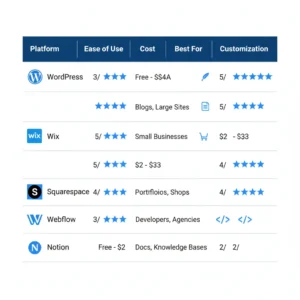
WordPress.com is best for writers, bloggers, and general professionals. Ease of use is medium. Customization is high with plugins. Cost is free for basic, 4 to 25 dollars per month for custom domain.
WordPress powers 43 percent of all websites. The free version gives you a functional portfolio with some limitations on design customization. You get more control with a paid plan.
Pros: huge template library, SEO-friendly, scales as you grow. Cons: steeper learning curve than drag-and-drop builders.
Wix is best for creatives who want easy customization. Ease of use is very easy. Customization is high with drag-and-drop. Cost is free with Wix branding, 16 to 27 dollars per month for custom domain.
Wix offers over 500 templates and an intuitive editor. You drag elements where you want them. No coding required.
Pros: beautiful templates, easy to use, good mobile optimization. Cons: free version shows Wix ads, harder to migrate later.
Notion is best for minimalists and tech professionals. Ease of use is easy. Customization is limited but clean. Cost is free for personal use.
Notion lets you build simple portfolio pages using their block system. The aesthetic is clean and minimal.
Pros: completely free, fast to set up, modern look. Cons: limited design customization, basic functionality.
Carrd is best for single-page portfolios. Ease of use is very easy. Customization is moderate. Cost is free for 3 sites, 19 dollars per year for Pro.
Carrd specializes in beautiful one-page websites. Perfect if you want a simple, elegant portfolio without multiple pages.
Pros: lightning fast, affordable, great templates. Cons: limited to simple sites, fewer features than other platforms.
Paid Platforms Worth Considering
Squarespace is best for designers and photographers. Ease of use is easy. Customization is high. Cost is 16 to 49 dollars per month.
Squarespace templates are gorgeous out of the box. Their design quality surpasses most competitors.
Pros: stunning templates, excellent image handling, all-in-one platform. Cons: more expensive, less flexibility than WordPress.
Webflow is best for designers who want full control. Ease of use is moderate to difficult. Customization is maximum. Cost is free for basic, 14 to 39 dollars per month for hosting.
Webflow gives you designer-level control without writing code. The learning curve is steeper but the results are professional.
Pros: complete design freedom, no coding needed, fast loading. Cons: steeper learning curve, more expensive.
For most people, start with WordPress.com or Wix. Both offer free versions to test before committing to paid plans.
Essential Pages and Sections
Your portfolio needs four core pages. Homepage, About, Portfolio, and Contact. Keep the structure simple and navigation clear.
Homepage Structure
Your homepage creates the first impression. It should communicate who you are and what you do within 5 seconds.
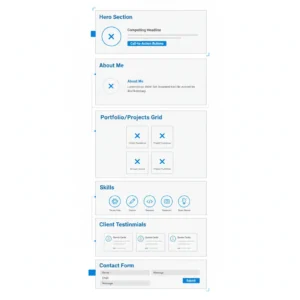
Include these elements.
Hero Section contains professional headline stating your role and specialty, brief value proposition as one sentence, professional photo or your best work sample, and call-to-action button like View My Work or Get In Touch.
Featured Projects show 3 to 6 of your best projects with thumbnail images and project titles, brief description as one sentence per project, and links to full case studies.
Brief About includes 2 to 3 sentences about your background and link to full About page.
Contact Section displays email address or contact form and links to LinkedIn and other professional profiles.
Keep homepage length to 2 to 3 scrolls maximum. Do not overwhelm visitors with too much information.
About Page Elements
Your About page tells your professional story. Make it personal but professional.
Structure includes opening paragraph about who you are and what you do. Background covers your relevant experience and education. Approach explains your work philosophy or methodology. Current Focus states what you are working on or interested in. Call to Action tells how people should contact you.
Include a professional photo. People connect better when they see your face. Your About page should complement your LinkedIn summary while providing deeper context.
Keep it under 400 words. Hiring managers skim. Make every sentence count.
Project Portfolio Page
This page showcases your best work. Quality beats quantity. Show 6 to 12 strong projects rather than 30 mediocre ones.
For each project, create a dedicated case study page.
Project Overview includes client or project name, your role, timeline, and tools and technologies used.
Challenge describes what problem needed solving, why it mattered, and any constraints you faced.
Solution explains your approach, key decisions you made, and how you executed.
Results state quantified outcomes when possible, visual before-after comparisons, and impact on the business or user.
Visuals show screenshots or photos, process sketches or wireframes, and final deliverables.
Include 5 to 10 images per case study. Show your process, not just the final product.
Contact Page Requirements
Make it easy for people to reach you. Include multiple contact options.
Essential elements are email address using a professional domain email, contact form with name email and message fields, LinkedIn profile link, and location as city and state, not full address. Include response time expectation.
Optional additions are calendar booking link like Calendly, phone number if comfortable, and social media profiles relevant to your work.
Set up an autoresponder confirming you received their message and when they will hear back.
How to Present Your Work Effectively
The way you present projects matters as much as the projects themselves.
Case Study Format
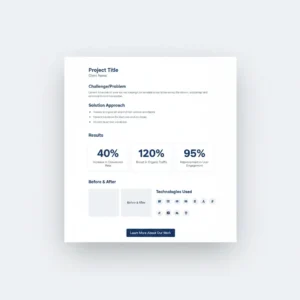
Transform project descriptions into compelling case studies using this structure.
Title and Thumbnail: create a descriptive title that includes the project type and outcome.
Example: Redesigning Mobile Checkout to Increase Conversions by 34 Percent.
Context explains the situation. Who was the client. What did they need.
Example: EcommerceApp was losing 60 percent of mobile users at checkout. Cart abandonment rates were double the industry average.
Your Role clarifies what you specifically did.
Example: As lead UX designer, I conducted user research, created wireframes and prototypes, and collaborated with the development team.
Process walks through your approach step by step.
Example: I started with user interviews to identify pain points. Then I analyzed heatmaps showing where users dropped off. I created 3 design variations and ran A/B tests.
Solution describes what you created and why.
Example: I simplified the checkout from 5 steps to 2, added Apple Pay integration, and redesigned form fields for mobile.
Results share measurable outcomes.
Example: After launch, mobile checkout completion increased 34 percent, cart abandonment dropped from 68 to 42 percent, and revenue from mobile grew by 127K dollars in 3 months.
Visuals include screenshots, mockups, or photos at each stage.
Project Selection Criteria
Choose projects that demonstrate range and results. Include work that shows different skill applications, increasing complexity or responsibility, measurable business impact, your problem-solving process, and collaboration with teams.
Avoid including old work that does not represent your current skill level, projects with weak outcomes, work you did not significantly contribute to, personal projects unless they are stronger than client work, and anything under NDA without permission.
If you lack professional work, include freelance or volunteer projects, personal passion projects, school assignments if recent and strong, open-source contributions, and spec work or redesigns of existing products.
Quality matters more than quantity. Six excellent case studies beat 20 mediocre samples.
Design Principles for Portfolio Websites
Your portfolio design should enhance your work, not distract from it.
Keep It Simple and Professional
Use a clean, minimal design. White or light gray backgrounds work best for most portfolios. Let your work be the focal point.
Design guidelines: stick to 2 fonts maximum, one for headlines and one for body text. Use a simple color palette with 2 to 3 colors. Include plenty of white space. Make navigation obvious and consistent. Use large, high-quality images.
Avoid busy backgrounds or patterns, multiple font styles, automatic music or videos, flashy animations, and cluttered layouts.
Your design should look professional, not trendy. Trends date quickly.
Mobile Responsiveness
Over 60 percent of portfolio views happen on mobile devices. Your site must work perfectly on phones and tablets.
Test your portfolio on iPhone with Safari, Android phone with Chrome, iPad or tablet, and desktop browsers like Chrome, Safari, and Firefox.
Check that text is readable without zooming, buttons are easy to tap, images load and display properly, navigation works smoothly, and forms are easy to fill out.
Most modern website builders handle mobile responsiveness automatically. Still test everything before launching.
Loading Speed Optimization
Slow websites lose visitors. 53 percent of mobile users abandon sites that take longer than 3 seconds to load.
Speed optimization tips: compress images before uploading using TinyPNG or Squoosh. Keep image files under 200KB each. Limit the number of custom fonts. Minimize use of videos. Use a content delivery network or CDN if available. Remove unnecessary plugins or widgets.
Test your site speed with Google PageSpeed Insights. Aim for scores above 80.
Writing Compelling Copy
Strong writing makes your portfolio memorable. Write clearly and specifically.
Your About Section
Write in first person. Make it conversational but professional.
Opening line formula: I am a role who helps target audience achieve outcome through your approach.
Example: I am a UX designer who helps SaaS companies increase user engagement through research-driven interface design.
Follow with 2 to 3 paragraphs covering your background and experience, what drives your work, what makes your approach unique, and what you are looking for next.
End with a call to action. Tell readers what to do next.
Example: I am currently open to senior designer roles at product-focused companies. If you are building something interesting, I would love to chat.
If you are changing careers, our career transition guide helps you frame your story effectively.
Project Descriptions
Write project descriptions that tell a story. Focus on the problem, your solution, and the results.
Strong descriptions start with the outcome or impact. Use active voice. Include specific numbers. Keep paragraphs short with 2 to 4 sentences. Avoid jargon or explain technical terms.
Example of weak description: This project involved redesigning a website for a client. I created new wireframes and mockups. The client was happy with the results.
Example of strong description: I redesigned the mobile experience for a healthcare app used by 50,000 patients. By simplifying navigation and adding quick-access features, I reduced time to book appointments by 45 seconds. Patient satisfaction scores increased from 3.2 to 4.6 out of 5.
The strong version includes specifics, outcomes, and impact.
Technical Setup Guide
Setting up your portfolio involves a few technical steps. All are straightforward.
Domain Name Selection
Your domain name is your web address. Choose something professional and memorable.
Best practices: use your full name if available like janedoe.com. Keep it short and easy to spell. Avoid numbers or hyphens. Choose .com if possible, though .design or .dev work for creatives.
Register domains through Google Domains at 12 dollars per year, Namecheap at 8 to 12 dollars per year, or Domain.com at 10 dollars per year.
Most website builders let you connect custom domains easily.
Hosting Setup
If you use WordPress.org which is self-hosted, you need separate hosting.
Recommended hosting providers: Bluehost at 2.95 to 13.95 dollars per month, SiteGround at 3.99 to 14.99 dollars per month, or HostGator at 2.75 to 5.95 dollars per month.
If you use Wix, Squarespace, or WordPress.com, hosting is included in your plan.
Connect your domain to your hosting by logging into your domain registrar. Find DNS or nameserver settings. Enter the nameservers provided by your hosting company. Wait 24 to 48 hours for propagation.
Most platforms offer step-by-step guides for this process.
Portfolio Examples by Profession
Study strong portfolios in your field. Note what works and adapt those strategies.
Designer Portfolios
Strong designer portfolios show high-quality images of finished work, before-after comparisons, process documentation like sketches and wireframes, client testimonials, and clear project categorization.
Example structure: homepage with hero image and 6 featured projects. Each project has its own page with problem, solution, and results. Clean navigation. Minimal text. Visual focus.
Developer Portfolios
Developer portfolios emphasize live project demos or GitHub links, code snippets showing clean code, technologies and frameworks used, contribution to open-source projects, and technical blog posts.Enhance your developer portfolio by earning recognized certifications in your tech stack.
Example structure: simple homepage listing projects with descriptions and tech stacks. Each project links to GitHub repository and live demo. About page explains specialties and interests.
Writer Portfolios
Writer portfolios highlight published articles or blog posts, writing samples by topic or industry, metrics like views, shares, and engagement, client testimonials, and writing services offered.
Example structure: homepage with brief bio and featured articles. Portfolio page organized by content type like blog posts, case studies, and white papers. About page with writing philosophy. Clear contact options.
Marketer Portfolios
Marketing portfolios demonstrate campaign results with metrics, strategy documents or plans, content samples, analytics screenshots, and ROI data.
Example structure: homepage highlighting biggest wins with numbers. Portfolio page with campaign case studies. Each case study shows challenge, strategy, execution, and results. Charts and graphs showing growth.
Promoting Your Portfolio
Build the portfolio, then promote it. Your website does not help if no one sees it.
SEO Basics for Portfolios
Optimize your portfolio for search engines so people find you when searching for your skills.
Basic SEO checklist: include your target keywords in page titles. Write descriptive meta descriptions for each page. Use header tags properly like H1, H2, and H3. Add alt text to all images. Include your location if you work locally. Get your portfolio indexed by Google Search Console.
Target keywords like your city plus your profession, your name, and your specialty plus portfolio.
Link to your portfolio from your LinkedIn profile, optimized resume, and email signature.
Sharing Your Portfolio
Add your portfolio URL to LinkedIn in your profile summary and contact info. Add to email signature. Add to resume header. Add to business cards. Add to social media bios. Add to job applications. Include your portfolio URL in all job board applications for maximum visibility
When applying for jobs, mention your portfolio in your cover letter.
Example: You will find detailed case studies of my work at yourname.com, including a project where I increased mobile conversions by 34 percent.
Share individual project case studies on LinkedIn. Tag companies or tools you used. This increases visibility and attracts potential clients or employers.
Common Portfolio Mistakes to Avoid
Too Many Projects: showing 30 mediocre projects dilutes your impact. Show 6 to 12 strong ones.
No Context: do not just show pretty pictures. Explain the problem you solved and the results you achieved.
Outdated Work: remove projects older than 3 to 5 years unless they are exceptional.
Poor Image Quality: blurry or low-resolution images look unprofessional. Use high-quality visuals.
Broken Links: test every link before launching. Broken links damage credibility.
Missing Contact Info: make it obvious how to reach you. Do not hide your email.
Auto-Playing Media: never auto-play music or videos. This annoys visitors.
Complicated Navigation: keep menu simple. Visitors should find your work in one or two clicks.
Spelling and Grammar Errors: proofread everything. Errors suggest carelessness.
No Mobile Testing: always check how your site looks on phones before launching.
Your Portfolio Launch Checklist
Before launching your portfolio, verify content, design, technical setup, SEO, and promotion steps are complete.
Content checks: homepage clearly states who you are and what you do. About page tells your story professionally. 6 to 12 strong projects included. Each project has a case study with context and results. Contact information is visible and correct. All text is proofread for errors.
Design checks: professional, clean design. Consistent fonts and colors throughout. High-quality images compressed for web. White space makes content easy to scan. Navigation is simple and obvious.
Technical checks: custom domain connected. All links work correctly. Forms submit properly. Site loads in under 3 seconds. Mobile version displays correctly. Tested on multiple browsers. Google Analytics installed if desired. Favicon uploaded.
SEO checks: page titles include keywords. Meta descriptions written for each page. Image alt text added. URL slugs are clean and descriptive. Submitted to Google Search Console.
Promotion checks: portfolio URL added to LinkedIn. URL added to resume and email signature. Shared on social media. Sent to close professional contacts.
Launch your portfolio when you check 90 percent of these boxes. Perfect is the enemy of done.
Frequently Asked Questions (FAQs)
Question: How long should my portfolio website be?
Keep your homepage to 2 to 3 scrolls. About page should be under 400 words. Each project case study should be 300 to 600 words with 5 to 10 images.
Q: How many projects should I include?
Include 6 to 12 of your strongest projects. Quality matters more than quantity. Update regularly as you complete better work.
Q: Do I need a custom domain?
A custom domain looks more professional than a free subdomain. It costs 8 to 15 dollars per year and makes your portfolio easier to remember and share.
Q: Should I include personal projects?
Yes, if they are strong and demonstrate relevant skills. Personal projects work well when you lack client work or want to show a new skill.
Q: How often should I update my portfolio?
Add new projects quarterly or whenever you complete work you are proud of. Remove older, weaker projects as you add stronger ones.
Q: Should I password protect my portfolio?
Only password protect if work is under NDA. Open portfolios get more views and attract more opportunities.
Your portfolio website separates you from candidates who rely only on resumes. It proves your capabilities with real examples and measurable results.
Start building today. Choose a platform, select 6 projects, and create basic case studies. Launch an imperfect version this week rather than waiting months for perfection.
The best portfolio is the one that exists. The second-best portfolio is the one you keep improving.
Your next opportunity might come from someone who discovers your portfolio in a search next week. Make sure it exists and shows your best work.
For more strategies on advancing your career, explore our career transition guide, LinkedIn optimization tips, and ATS resume strategies.