How to Optimize Your LinkedIn Profile to Attract Recruiters in 2026
Sarah spent three months applying to marketing roles with no response. Her resume was strong. Her experience was solid. Yet recruiters never contacted her.
The problem was not her qualifications. The problem was her LinkedIn profile.
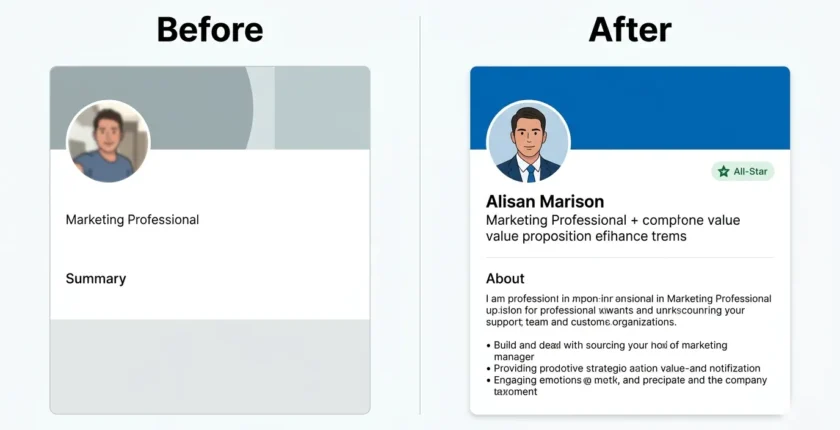
Her headline read “Marketing Professional.” Her summary was two sentences. Her profile photo was a cropped vacation picture. Recruiters searching for marketing talent never found her because her profile did not include the keywords they searched for.
After optimizing her profile following LinkedIn profile optimization best practices 2026, Sarah received five recruiter messages in two weeks. She accepted a senior marketing role at a tech company within six weeks.
What changed everything for Sarah was understanding LinkedIn SEO: how LinkedIn’s search algorithm ranks profiles by keyword relevance, profile completeness, and activity signals and how to use each one to reach All-Star status and appear at the top of recruiter searches.
Your LinkedIn profile is your professional storefront. Over 87% of recruiters use LinkedIn to evaluate candidates before interviews, according to LinkedIn’s 2024 Recruiting Trends report. Your profile needs to work for you even when you are not actively job searching.
This guide shows you exactly how to optimize every section of your LinkedIn profile to attract recruiters, build professional connections, and advance your career.
Profiles with professional photos receive 21x more views than those without
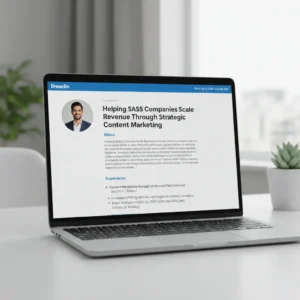
Table of Contents
Why LinkedIn Profile Optimization Directly Affects Recruiter Visibility
LinkedIn has 930 million users worldwide. Over 77 million of those users are in the United States alone. Every week, 52 million people search for jobs on the platform.
Recruiters do not browse all 930 million profiles. Following LinkedIn profile optimization best practices in 2026 ensures your profile includes the search terms, skills, and qualifications they look for. If your profile does not include these search terms, you become invisible.
LinkedIn uses a profile completeness score to determine search ranking. Reaching All-Star status, LinkedIn’s highest completeness tier, makes your profile up to 40 times more discoverable. Your LinkedIn SSI (Social Selling Index) score, visible at linkedin /ssi, measures profile strength across four dimensions and correlates directly with recruiter visibility.
LinkedIn Profile Statistics: What the Data Says About Search Visibility
Profiles with professional photos receive 21 times more profile views and 9 times more connection requests than profiles without photos, based on LinkedIn internal data.
Complete profiles with all sections filled appear in search results 40 times more often than incomplete profiles.
Profiles with five or more skills listed receive 17 times more profile views.
Members who add their location receive up to 23 times more profile views.
These numbers matter because visibility leads to opportunities. More profile views mean more recruiter contacts. More recruiter contacts mean more interview invitations.
What Recruiters Look for When Reviewing Your LinkedIn Profile
Recruiters spend an average of 6 minutes reviewing your LinkedIn profile before deciding to contact you. They look for specific elements in this order:
Professional photo that builds trust. Headline that clearly states your value. Current role and company. Summary that highlights relevant experience. Work history with quantified achievements. Skills that match their job requirements. Recommendations from credible sources. Activity and engagement level.
Creating a portfolio website alongside your LinkedIn profile gives recruiters even more proof of your capabilities.
Your profile needs to deliver these elements immediately. Recruiters will not dig through poorly organized information.
5 LinkedIn Profile Sections That Drive 90% of Recruiter Decisions
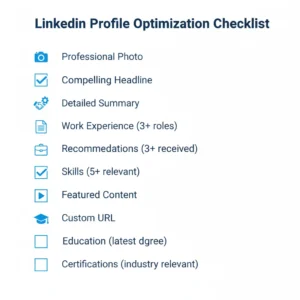
These are the LinkedIn profile optimization best practices 2026 you need to focus on first. Five profile sections drive 90 percent of recruiter decisions.
Profiles that are 100% complete appear in search results 40x more often.
Professional Profile Photo
Your profile photo creates the first impression. Use a high-resolution headshot with these specifications.
Face takes up 60 percent of the frame. Plain background in white, gray, or light blue. Professional attire appropriate for your industry. Natural smile and direct eye contact. Good lighting with no shadows on the face. Current photo taken within the last 2 years.
Do not use vacation photos. Do not use group photos cropped to show only you. Do not use selfies taken in your car. Do not use photos with sunglasses or hats. Do not use low-resolution or blurry images. Do not use photos with distracting backgrounds.
Upload your photo at 400×400 pixels minimum for best quality. For professional headshot examples and tips, see our portfolio building guide.
LinkedIn provides official photo guidelines you should review before uploading.
Compelling Headline
Your headline appears in every search result and connection request. This 220-character space determines whether people click your profile.
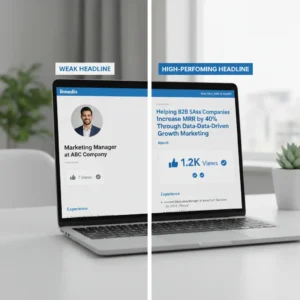
Most professionals waste this space with generic titles like Marketing Manager at ABC Company. This headline does not explain what you do or who you help.
Use this formula instead. What you do for whom you help to achieve what result.
Weak headline: Senior Software Engineer. Strong headline: Senior Software Engineer Helping FinTech Startups Build Scalable Payment Systems.
Weak headline: HR Manager. Strong headline: HR Manager Reducing Employee Turnover by 40 Percent Through Strategic Talent Development.
Weak headline: Freelance Writer. Strong headline: B2B SaaS Content Writer Driving 200K Plus Monthly Organic Visits for Tech Companies.
Strategic Summary Section
Applying linkedin profile optimization best practices 2026 to your summary means writing in first person, using short paragraphs, and including keywords from your target job descriptions. This 2,600-character section should answer three questions: what you do, who you help, and what results you have achieved.
Add specific achievements with numbers. Learn more about keyword optimization in our ATS resume tips guide.
Structure your summary like this.
Paragraph 1: Open with your biggest achievement or value proposition.
Paragraph 2: Explain your expertise and specialties.
Paragraph 3: Share 3 to 5 quantified accomplishments.
Paragraph 4: State what opportunities interest you.
Paragraph 5: Add a call to action with contact information.
Keep each paragraph to 3 to 4 sentences maximum.
Detailed Experience Entries
Your experience section needs more than job titles and company names. Each role should include a brief description of the company and your role, 3 to 5 bullet points highlighting specific achievements, quantified results whenever possible, keywords from your industry, and links to projects or portfolio work.
Write each bullet point to show impact, not just responsibilities. Apply the same quantification strategies from our resume optimization guide to your LinkedIn experience section.
Before: Managed social media accounts. After: Grew Instagram following from 2,500 to 47,000 in 8 months, driving 12,000 website visits monthly.
Before: Led product development team. After: Led 8-person product team to launch 3 features used by 200,000 plus active users.
Skills and Endorsements
LinkedIn allows 50 skills on your profile. Add skills that recruiters search for in your industry. Order matters because LinkedIn displays your top 3 skills most prominently.
To find the right skills, review 10 job descriptions for your target role. Note which skills appear most frequently. Add those skills to your profile. Pin your most important 3 skills to the top.
Consider earning certifications in your top skills to add credibility. See our guide on certifications worth getting.
Request endorsements from colleagues who have worked with you on projects using those skills.
How to Write a LinkedIn Headline That Ranks in Recruiter Searches
Your headline is the most important real estate on your profile. Follow this proven formula.
What you do for whom you help to achieve what result.
The LinkedIn Headline Formula Recruiters Actually Click
Use this template to write your headline.
Your role helping target audience achieve a specific outcome through your approach or method.
Fill in each bracket. Your role is your job title or expertise area. The target audience is those who benefit from your work. A specific outcome is the measurable result you deliver. Your approach is your unique method or strategy.
Keep it under 220 characters. Remove filler words. Every word should add value.
Strong headlines generate 40% more profile views.
15 LinkedIn Headline Examples for Every Industry (Copy-Paste Templates)
These examples reflect LinkedIn profile optimization best practices 2026 across different industries. Adapt each template to your specific results.
Marketing: Growth Marketing Manager Scaling SaaS Companies from 1M to 10M ARR Through Performance Campaigns.
Sales: Enterprise Sales Leader Closing 5M Plus Deals for Cloud Security Solutions.
Technology: Full-Stack Developer Building HIPAA-Compliant Healthcare Applications with React and Node.js.
Finance: Financial Analyst Helping Series B Startups Secure 20M Plus in Venture Funding.
Human Resources: Talent Acquisition Specialist Reducing Time-to-Hire by 50 Percent for Tech Companies.
Education: Curriculum Designer, Creating Engaging Online Courses for 100K Plus Students.
Healthcare: Registered Nurse Improving Patient Outcomes Through Evidence-Based Care Protocols.
Design: UX Designer Increasing Mobile App Conversion Rates by 85 Percent Through User Research.
Operations: Operations Manager, Reducing Supply Chain Costs by 2M Annually Through Process Optimization.
Consulting: Management Consultant Helping Fortune 500 Companies Execute Digital Transformation.
Real Estate: Commercial Real Estate Broker Closing 50M Plus Transactions in Urban Development.
Legal: Corporate Attorney Protecting Startup Interests Through Strategic IP and Contract Law.
Engineering: Mechanical Engineer Designing Energy-Efficient HVAC Systems for Commercial Buildings. P
roduct Management: Product Manager Launching Mobile Features Used by 5M Plus Active Users.
Customer Success: Customer Success Manager Achieving 95 Percent Retention Rate for B2B SaaS Clients.
LinkedIn About Section: How to Write a Summary That Converts Profile Views
Your summary tells your professional story. Start with a hook that grabs attention. Follow with your expertise, achievements, and what you are looking for.
LinkedIn About Section Template: Structure That Gets Responses
Paragraph 1 is your hook. Open with your biggest achievement, an interesting fact about your career, or a problem you solved.
Example: I have helped 47 SaaS companies increase their monthly recurring revenue by an average of 34 percent in 6 months.
Paragraph 2 explains your expertise. Explain what you do and your areas of expertise. Include keywords.
Example: I specialize in growth marketing for B2B software companies. My expertise includes performance marketing, conversion rate optimization, email automation, and analytics.
Paragraph 3 shares achievements. Share 3 to 5 specific accomplishments with numbers.
Example: In my current role as Growth Marketing Manager at CloudTech, I have increased trial signups by 127 percent through optimized landing pages, reduced customer acquisition cost from 450 dollars to 180 dollars, built an email nurture sequence generating 2M in annual revenue, and grown organic search traffic from 5K to 85K monthly visitors.
Paragraph 4 states what you are looking for.
Example: I am passionate about helping early-stage SaaS companies build scalable growth engines. If you are looking for someone who combines analytical thinking with creative marketing, let’s connect.
Call to Action ends with how people should contact you.
Example: Feel free to reach out at your email at email.com or send me a message here on LinkedIn.
What to Include and Exclude
Include specific skills and expertise areas. Include quantified achievements. Include industry keywords. Include what makes your approach unique. Include your career goals or what you are seeking. Include contact information.
Exclude generic statements like hard worker or team player. Exclude long lists of soft skills without examples. Exclude entire career history; save that for the experience section. Exclude personal hobbies unless relevant to your profession. Exclude fluffy language without substance.
Keep paragraphs short. Use bullet points for achievements. Write as you talk.
LinkedIn Experience Section: Turn Job Duties Into Keyword-Rich Achievements
Your experience section needs a strategic structure. For each role, include company context, your responsibilities, and specific achievements.
How to Quantify LinkedIn Experience Bullet Points for Maximum Impact
Transform responsibilities into achievements by adding numbers.
Before: Managed social media accounts. After: Grew Instagram following from 2,500 to 47,000 in 8 months, driving 12,000 website visits monthly.
Before: Led product development team. After: Led 8-person product team to launch 3 features used by 200,000 plus active users.
Before: Improved customer satisfaction. After: Increased customer satisfaction score from 3.2 to 4.7 out of 5 through new support processes.
If you do not have exact numbers, estimate reasonably. Use phrases like approximately, over, or nearly.
LinkedIn Keyword Placement: Where to Put Keywords in Your Profile
Include industry keywords in your experience descriptions. These help you appear in recruiter searches.
To find relevant keywords, copy 5 job descriptions for the roles you want. Paste them into a word cloud generator. Note the most frequent terms. Weave those terms naturally into your experience.
For example, if project management, cross-functional teams, and agile methodology appear frequently, include those phrases in your descriptions.
Do not stuff keywords unnaturally. Write for humans first, search algorithms second.
How LinkedIn Recommendations Improve Search Ranking and Social Proof
Recommendations serve as social proof. They validate your skills and work ethic through third-party testimonials.
Aim for at least 3 recommendations from former managers, colleagues you worked closely with, and clients or customers you served.
Recent recommendations carry more weight than old ones. Request new recommendations every 6 to 12 months.
How to Request a LinkedIn Recommendation (Template That Gets Yes)
Do not send the generic LinkedIn request. Write a personalized message.
Template: Hi Name, I hope you are doing well. I am updating my LinkedIn profile and would appreciate a recommendation from you about our time working together at Company. Specifically, it would be great if you mentioned specific project or skill. I would be happy to write one for you as well. Let me know if you need any information from me. Thanks, Your Name.
Make it easy for them by suggesting what to highlight. Offer to reciprocate.
Recommendation Template
When writing recommendations for others, follow this structure.
State your relationship and how long you worked together. Highlight 2 to 3 specific strengths. Share a concrete example or achievement. End with a strong endorsement.
Example: I worked with Jennifer for 2 years at TechStart, where she led our customer success team. Jennifer has an exceptional ability to turn frustrated customers into advocates. She personally saved 15 accounts worth over 500K in annual revenue through her strategic problem-solving. Jennifer is the first person I would hire for any customer-facing role.
Keep it to 150 to 200 words. Be specific, not generic.
LinkedIn Network Growth: Reach 500+ Connections to Boost Search Visibility
Your network size affects your visibility. LinkedIn’s algorithm shows your profile to more people when you have more connections.
Focus on quality over quantity. Connect with people in your industry, recruiters who specialize in your field, alumni from your school, members of professional groups you belong to, and people who engage with your content.
If networking feels overwhelming, check our networking tips for introverts for strategies that feel more natural.
Avoid connecting with random people. Build a network of relevant professionals. Find associations through directories like ASAE.
Growing Your Network
Turn on Creator Mode if you post content regularly. Creator Mode switches your profile layout to surface your content first, adds a Follow button, and grants access to LinkedIn Live and newsletters all of which strengthen the LinkedIn algorithm’s recency and engagement signals for your profile.
Connection Request Best Practices
Personalize every connection request. The generic I would like to add you to my professional network gets ignored 60 percent of the time.
Strong connection request template: Hi Name, I came across your profile while researching the industry, company, or topic. I am particularly interested in a specific thing from their profile. I would love to connect and learn from your experience in their expertise area. Your Name.
Keep it under 300 characters. Reference something specific about them. Explain why you want to connect.
Engagement Strategies
Engagement increases your visibility. When you comment on posts, like content, or share articles, you appear in your network’s feed.
Daily engagement routine: spend 15 minutes each morning on LinkedIn. Like 5 to 10 posts from your connections. Leave thoughtful comments on 2 to 3 posts. Share one relevant article or insight. Respond to all comments on your posts.
Post your own content once or twice per week. Share industry insights, lessons learned, or useful resources.
Need help finding relevant courses to share? Browse our best career courses guide for trending professional development topics.
The algorithm rewards consistent engagement. Regular activity keeps you visible to recruiters and connections.
Learn more about how LinkedIn’s algorithm works from their official resources.
How to Track LinkedIn Profile Analytics and Improve Search Appearances
LinkedIn provides detailed analytics documentation to help you understand your metrics.
Key Metrics to Monitor
Check these metrics weekly.
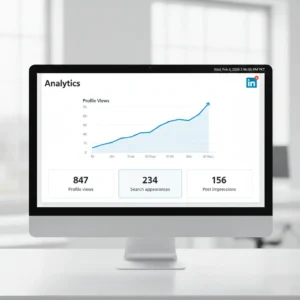
Track your profile views weekly to measure optimization success.
Profile Views: How many people viewed your profile in the last 90 days? Aim for steady growth month over month.
Search Appearances: How often you appeared in LinkedIn searches. Higher numbers mean better keyword optimization.
Post Impressions: How many people saw your posts? Indicates content relevance and network engagement.
Connection Growth: Net new connections added. Target 10 to 20 quality connections per month.
If your metrics plateau or decline, audit your profile. Are you using current industry keywords? Is your profile 100 percent complete? Are you engaging regularly? Have you posted content recently?
Test changes to your headline and summary. Track how they affect your search appearances.
10 LinkedIn Profile Mistakes That Make You Invisible to Recruiters
Incomplete Profile: Fill every section. Incomplete profiles rank lower in search.
Generic Headline: Do not waste your headline on the job title alone. Add your value proposition.
No Profile Photo: Profiles without photos receive 21 times fewer views.
Keyword Gaps: If your profile lacks industry keywords, recruiters will not find you.
Passive Voice: Write in active voice. Say I increased sales by 40 percent, not that sales were increased.
Outdated Information: Update your profile within 2 weeks of changing roles or completing major projects.
No Custom URL: Claim your custom LinkedIn URL for cleaner sharing. Use linkedin.com/in/yourname format.
Ignoring Recommendations: Zero recommendations signal a lack of credibility.
Not Engaging: Profiles with no activity appear dormant. Comment and post regularly.
Spelling and Grammar Errors: Proofread everything. Errors damage your professional image.
Your 7-Day LinkedIn Optimization Action Plan
This action plan puts LinkedIn profile optimization best practices 2026 into a structured, one-week workflow you follow from start to finish.
Day 1 Profile Audit: Review each section of your profile. Note missing or weak areas. List 10 keywords from target job descriptions.
Day 2 Photo and Header: Upload a professional profile photo. Add a custom background banner. Claim custom URL.
Day 3 Headline and Summary: Rewrite the headline using the value proposition formula. Draft summary with achievements and keywords. Proofread and publish.
Day 4 Experience Section: Update all job descriptions. Add quantified achievements to each role. Include relevant keywords.
Day 5 Skills and Recommendations: Add 20 to 30 relevant skills. Pin the top 3 skills. Request 3 recommendations.
Day 6 Additional Sections: Add certifications and education. Upload portfolio samples to the Featured section. Join 5 relevant LinkedIn groups.
Day 7 Engagement and Connections: Send 10 personalized connection requests. Comment on 5 posts. Share one article with your insights.
Set up a systematic job search process using our 30-day job search plan.
Repeat the engagement activities from Day 7 every weekday going forward.
Frequently Asked Questions
Q: What are the LinkedIn profile optimization best practices 2026 I should prioritize?
Start with your headline, professional photo, and keyword-rich summary. These three sections drive the most recruiter visibility. Then build out your experience with quantified achievements and pin your top five skills.
Q: How often should I update my LinkedIn profile?
Update your profile every time you complete a significant project, earn a certification, or change roles. Review and refresh your summary and headline every 3 to 6 months. For a complete career transition strategy, follow our career change guide.
Q: Should I include all my work experience?500-plus
Include relevant experience from the last 10 to 15 years. Older roles add less value unless they are highly relevant to your current career path.
Q: How many connections do I need?
Quality matters more than quantity. Aim for 500 plus connections in your industry. This gives you access to second-degree networks and improves search visibility.
Q: Should I turn on Open to Work?
When you enable Open to Work, LinkedIn’s algorithm actively surfaces your profile in recruiter searches filtered by job-seeker status. Selecting “recruiters only” keeps the green frame hidden from your current employer while still boosting your connection proximity score with hiring professionals in your target field.
Q: Do I need LinkedIn Premium?
Premium helps if you are actively job searching because it shows who viewed your profile and lets you send InMail to recruiters. For most professionals, the free version is sufficient.
Q: How do I know if my profile is optimized?
Your profile is optimized when you receive regular recruiter messages, profile views increase month over month, and you appear in searches for your target keywords.
Your LinkedIn profile works for you 24 hours a day, 7 days a week. Invest time in optimization now, and you will see returns for years.
The difference between being overlooked and being contacted by recruiters often comes down to these profile details. Make the changes. Track your results. Adjust based on what works.
Combine your optimized LinkedIn profile with strategic use of job boards for maximum visibility.
Start with your headline today. Update it using the formula in this guide. That one change alone will increase your visibility.
Your next career opportunity might come from a recruiter who finds your profile in a search next week. Make sure they find the optimized version.
For more strategies on advancing your career, explore our complete career transition guide, ATS resume tips, and portfolio building guide.
For additional career resources, visit the Society for Human Resource Management.